
Catalog APIs for developers
Execute classification, enrichment, and workflow automation via API. Bring catalog intelligence into your own apps, PIMs, and onboarding systems.
Build with catalog primitives
Programmatic access to the operations product teams usually run by hand.
Product classification
Classify products into ETIM, ECLASS, UNSPSC, or your own taxonomy and return structured attributes with traceability.
Content enrichment
Extract specs from manufacturer sites and PDFs, generate content, and normalize attributes in your own workflows.
Workflow execution
Trigger ingestion, validation, and publishing flows from your application instead of rebuilding catalog tooling in-house.
Define once, execute anywhere
Configure your workflow in our dashboard, then call it via API. No manual work, no re-configuration.
Configure your workflow
Use our visual workflow builder to define your catalog operation. Configure how AI agents perform tasks and define the exact output schema you need.
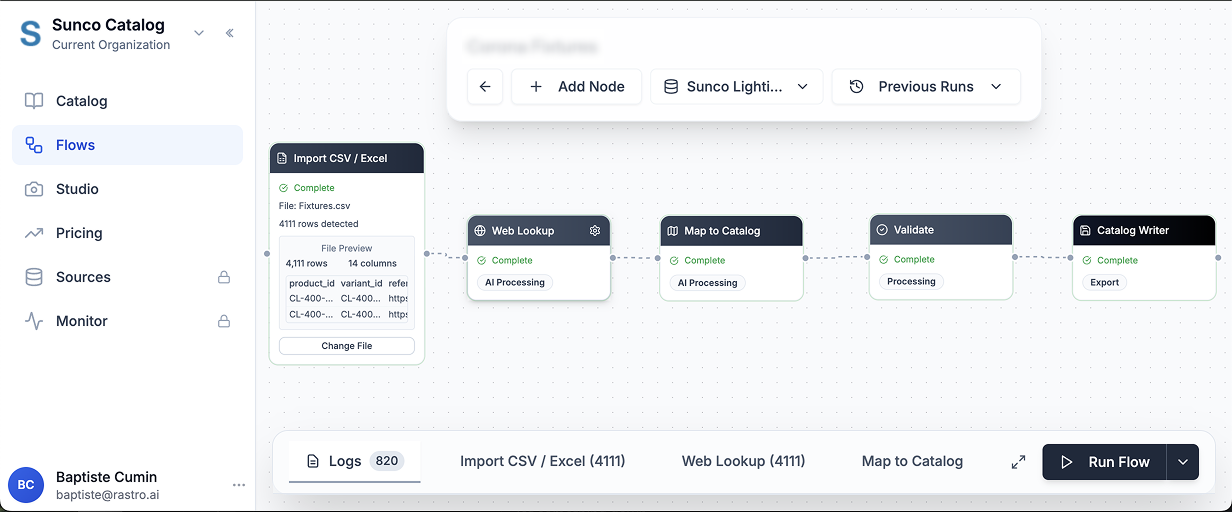
Configure agent behavior
- •Set instructions for how AI should extract data
- •Define scraping rules and fallback logic
- •Configure retry policies and timeouts
Define output schema
- •Specify exactly what fields you need
- •Set data types and validation rules
- •Map to your existing data structure
Example workflows:
- →Classify new products into ETIM or customer-specific taxonomy
- →Scrape product specs from manufacturer sites and PDFs
- →Generate channel-ready descriptions and approval-ready output
Execute via API
Send input data to your workflow and get processed results back. Poll for status or set up webhooks for completion.
{
  "input": [
    {
      "product_name": "Example Product",
      "competitor_url": "https://...",
      "sku": "SKU-123"
    }
  ]
}Get processed results
Receive structured output with pricing data, enriched content, or extracted specs. Ready to feed into your systems.
{
  "workflow_run_id": "550e8400-e29b...",
  "status": "completed",
  "results": [
    {
      "product_name": "Example Product",
      "competitor_price": "89.99",
      "specs": {
        "dimensions": "10x8x5",
        "weight": "2.5 lbs"
      }
    }
  ]
}
Workflow execution API
Execute workflows programmatically via API. Send input data and get processed results.
/public/workflows/{workflow_id}/executeExecute a workflow with custom input data. Returns a workflow run ID for polling status.
Request Body
{
  "input": [
    {
      "product_name": "Example Product",
      "price": "99.99",
      "description": "Product description"
    },
    {
      "product_name": "Another Product",
      "price": "149.99",
      "description": "Another description"
    }
  ]
}
Response
{
  "workflow_run_id": "550e8400-e29b-41d4-a716-446655440000",
  "workflow_id": "bd749dc2-c013-43f9-8495-f4ab1c0f92e1",
  "workflow_name": "Product Processing",
  "status": "running",
  "created_at": "2024-01-15T10:30:00Z",
  "poll_url": "/api/public/workflows/runs/550e8400-e29b...",
  "workflow_url": "https://dashboard.rastro.ai/flows/...",
  "total_nodes": 5,
  "message": "Workflow execution started with 2 input records"
}
Response Fields
workflow_run_idUnique identifier for this workflow execution. Use this to poll for status updates.
statusCurrent execution status: running, completed, or failed
poll_urlEndpoint to check execution progress and retrieve results when complete.
Ready to build on the API?
Get API access and plug classification, enrichment, and workflow execution into your platform.